9 Effective Ways to Get Your Website Indexed by Google Fast
May 18, 2026
Getting your website indexed by Google is one of the most important steps in SEO. If your pages are not indexed, they will not appear in Google search results, and people will not be able to find your website online. Many website owners publish content and wait for traffic, but sometimes Google takes a long time to discover and index pages. The good news is that there are several simple ways to speed up the indexing process.
In this article, we will explain 9 effective ways to get your website indexed by Google fast using simple and easy methods.
What Does Google Indexing Mean?
Google indexing is the process where Google discovers, crawls, and stores your web pages in its database. Once a page is indexed, it can appear in search engine results pages when users search for related keywords. If your page is not indexed, it will not show on Google search results even if the content is good.
Why Fast Google Indexing is Important
Fast indexing helps your website:
- Appear on Google quickly
- Get traffic faster
- Improve SEO performance
- Reach more customers
- Rank for target keywords
- Increase online visibility
For blogs, business websites, and eCommerce stores, faster indexing is very important for online growth.
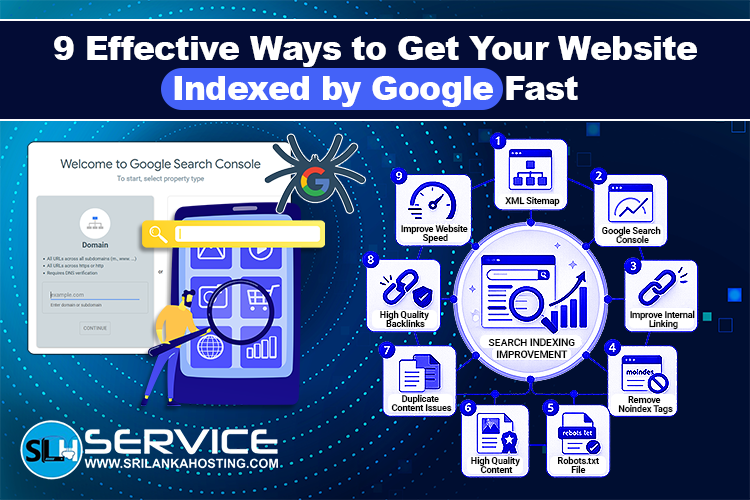
1. Create and Submit an XML Sitemap
An XML sitemap helps Google understand your website structure. It contains a list of important pages on your website.
A sitemap helps search engine crawlers:
- Discover new pages
- Crawl content faster
- Understand website structure
- Index pages more efficiently
After creating your sitemap, submit it through Google Search Console. This helps Google find your pages quickly.
2. Use Google Search Console
Google Search Console is one of the best free SEO tools for monitoring your website indexing status.
You can use it to:
- Check indexed pages
- Request indexing manually
- Find crawl errors
- Monitor search performance
- Submit sitemaps
The URL Inspection Tool allows you to request indexing for new pages and updated content.
3. Improve Internal Linking
Internal links help Google move from one page to another on your website.
When your pages are connected properly, search engine bots can discover content faster.
Good internal linking also helps:
- Improve user experience
- Increase page authority
- Reduce orphan pages
- Improve crawlability
Try linking new pages from your most popular blog posts and website pages.
4. Remove Noindex Tags
A noindex tag tells Google not to index a page. Sometimes website owners accidentally add noindex tags to important pages. This prevents those pages from appearing in search results. Check your website source code or SEO plugin settings to make sure important pages do not contain noindex tags.
5. Check Your Robots.txt File
The robots.txt file controls how search engines crawl your website.
If important pages are blocked inside the robots.txt file, Google will not crawl or index them.
Make sure your robots.txt file does not block:
- Blog posts
- Service pages
- Product pages
- Category pages
- Important website sections
A properly configured robots.txt file helps improve indexing speed.
6. Publish High Quality Content
Google prefers useful and valuable content.
Low quality or duplicate content can slow down crawling and indexing. High quality content has a better chance of being indexed quickly.
Good content should:
- Be original
- Answer user questions
- Use target keywords naturally
- Be easy to read
- Include headings and proper formatting
Regularly publishing fresh content also helps Google visit your website more often.
7. Fix Duplicate Content Issues
Duplicate content can confuse search engines.
If multiple pages contain very similar content, Google may skip indexing some of them.
To avoid duplicate content problems:
- Use canonical tags
- Remove copied pages
- Avoid repeated text
- Create unique descriptions
- Merge similar pages if needed
Unique content improves SEO and indexing performance.
8. Get High Quality Backlinks
Backlinks are links from other websites to your site.
Google discovers many websites through backlinks. When trusted websites link to your pages, Google may crawl and index them faster.
High quality backlinks can also improve:
- Website authority
- Search rankings
- Organic traffic
- Trust and credibility
Focus on getting natural backlinks from relevant and trusted websites.
9. Improve Website Speed and Technical SEO
A fast and technically optimized website helps search engines crawl pages more efficiently.
Slow websites can reduce crawl activity and delay indexing.
To improve technical SEO:
- Use fast hosting
- Optimize images
- Enable caching
- Use HTTPS security
- Fix broken links
- Improve mobile responsiveness
Good technical SEO helps both users and search engines.
How Long Does Google Take to Index a Website?
Google indexing times can vary.
Some pages may be indexed within a few hours, while others can take days or weeks.
Several factors affect indexing speed:
- Website authority
- Content quality
- Internal links
- Backlinks
- Technical SEO
- Crawl budget
Following the methods in this article can help speed up the process.
How to Check if Google Indexed Your Website
You can check indexing status using Google Search Console or by searching on Google.
Use this search format:
- site:yourdomain.com
This shows indexed pages from your website.
You can also inspect individual URLs using the URL Inspection Tool in Google Search Console.
Common Reasons Why Google Is Not Indexing Your Website
Here are some common indexing problems:
- Noindex tags
- Blocked robots.txt file
- Duplicate content
- Poor website structure
- Thin content
- Slow website speed
- No backlinks
- Crawl errors
Fixing these issues can improve indexing performance.
Final Thoughts
Getting your website indexed by Google fast is very important for SEO
success. Without indexing, your pages cannot appear in search results or
attract organic traffic. By creating a sitemap, improving internal links, fixing technical SEO
problems, publishing high quality content, and using Google Search Console
properly, you can help Google discover and index your pages faster.